
As a valued System Architect® customer, we want to let you know that a new version of System Architect has been commercially released. We continue to drive improvements to the product within themed areas to enable you to build and maintain a strategic, value-driven enterprise architecture.
System Architect 2027 – Version 11.4.14 – provides the following enhancements:
Frameworks – Support for ArchiMate 4
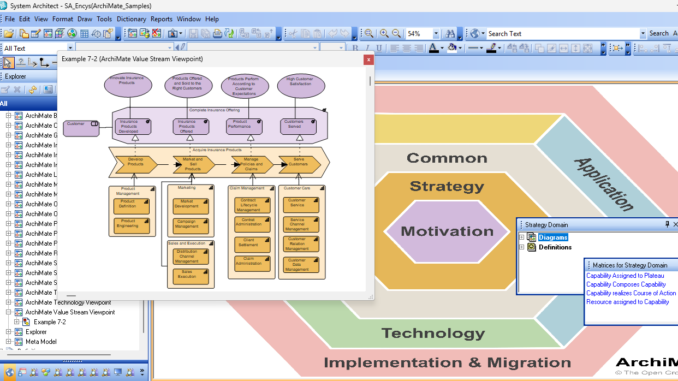
System Architect now supports ArchiMate 4, which is the latest version of the ArchiMate specification, finalized by The Open Group in April, 2026.
With ArchiMate 4, The Open Group streamlined the specification, and introduced new core concepts to more readily enable the modeling of Artificial Intelligence (AI) agents and Human interactions. System Architect also provides support for a new interactive ArchiMate 4 Framework Editor, and an ArchiMate Value Stream viewpoint.
In addition, ArchiMate modeling is now available to users as part of the base price of System Architect. If you wish to use ArchiMate support, please ask your sales associate to modify your license to include the ArchiMate add-on.
Usability – Dialogs Can Now Be Stretched
In a major usability enhancement, most dialogs in System Architect can now be stretched, with fonts resized accordingly.
This encompasses menu dialogs and all diagram, definition, and symbol property dialogs, including user property customizations set by usrprops.txt. The stretching is enabled by default but can be turned off. See the help topic “Customizing Dialog Sizes”.
Usability – Display Properties Completely Outside Symbols
Displayable properties can now be configured to be presented outside of node and line symbols, via a new option in the Text Position dialog.
- You may save this setting for all new symbols in the Text Style option of the Symbol Style menu.
- These text regions will get auto sized if so configured by options in the Display Mode dialog and the Preferences dialog.
Usability – Modernized Customize Method Support dialog
The Customize Method Support dialog (otherwise known as System Architect Property Configuration dialog) has been modernized with new tabs and easier-to-understand categorizations.
- A new choice is provided in the dialog to have changes applied to all future encyclopedias.The changes made are stored in an usradv.cfg file, which can be copied on encyclopedia creation.
- A new Show All Options checkbox enables the older format of options to be presented. The two views are synchronized.
Usability – Modernized Preferences dialog
The Tools, Preferences dialog has been modernized with new tabs and easier-to-understand categorizations.
Usability – Modernized Session Options dialog
The Session Options dialog has been modernized with entries now grouped into categories.
SA XT Diagramming – Displayable Properties: You may now visualize displayable properties in SA XT. This includes the new feature of being able to display properties completely outside the symbol.
- The BORDER keyword configurations and the notation font are used.
- You can control displayable properties by a new Display Mode dialog.
- As in System Architect rich client, AutoSize of nodes is supported. It is activated by combination of options in the Display Mode dialog and Preferences dialog.
- Preferences are stored in catalog data, unique for each user..
SA XT Diagramming – Run Analytics & Explorer Object & Relationship Reports
You may now run analytics and Explorer Object and Relationship reports by drag-and-dropping them via Choices in SA XT.
SA REST API Supports CORS Header for Multiple Allowed Hosts
The SA REST service configuration now allows multiple CORS hosts for making script-based calls to the REST Service. Hosts may be entered in the SA REST Configuration Wizard’s CORS Access-Control-Allow-Origin setting, or the SARestWebService.exe.config file, separating the entries by commas. Using this configuration option allows you to satisfy requirements to avoid CORS (Cross Origin Resource Sharing) errors.
Client Issues
A number of client issues are also fixed, as enumerated and described in the Release Notes.
Get this Latest Release!
To request this new release of System Architect, please log in or register on the UNICOM Customer Portal – https://support.unicomsi.com, or email to Architect.support AT unicomsi.com.
At UNICOM, our commitment is to ensure that ongoing research and development continue for all UNICOM Software Solutions and to maintain the highest standards of technical support for you, our customers.
Sincerely,
UNICOM® Systems, Inc.
Technical Support
Note: this page is a copy of the information presented on the UNICOM Systems site.
Be the first to comment